

I was delighted to see yet another extremely informative webinar from Antivia. They partnered together with FedEx to deliver a compelling webinar that discusses how organizations can use dashboards to simplify the consumption of key corporate information. Donald MacCormick kicked off the webinar with a reminder that we don’t always see what we think we […]
Category Archives: Dashboards
Preview of Dashboards on the iPad
Here is a quick preview video of dashboards running on the iPad using HTML5. We should see this functionality available by end of 2012. I think it looks pretty good so far. Xcelsius on iPad Preview This is a preview of the new product changes based on SAP’s statement of direction for Xcelsius. For all […]
BusinessObjects BI Decision Tree
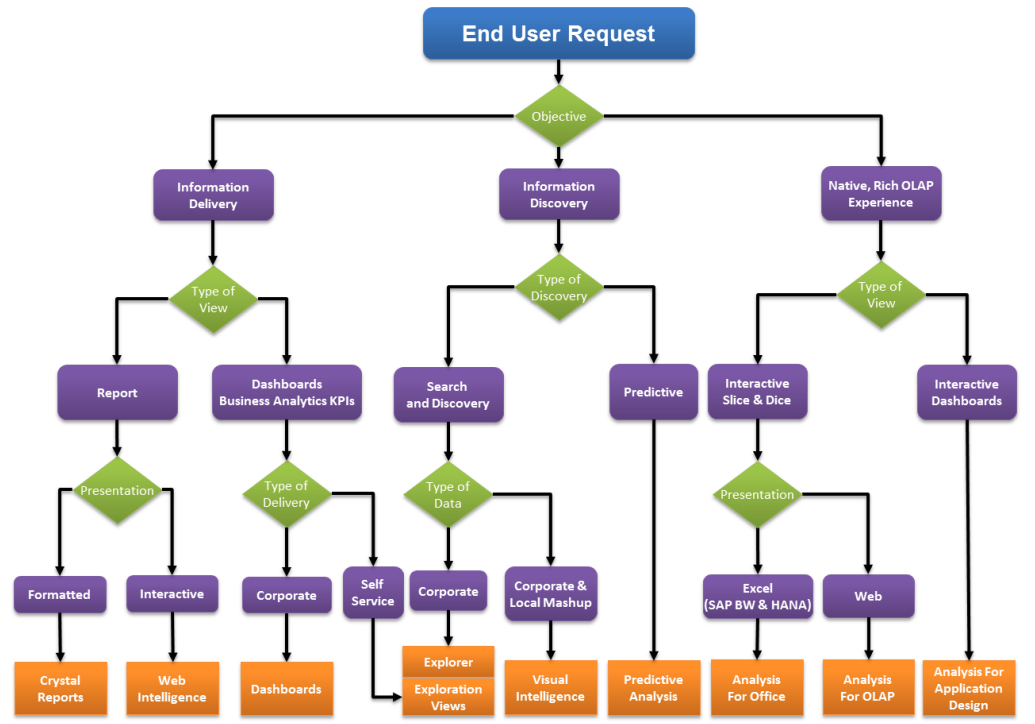
UPDATE 10/5/2012: Things have continued to evolve since May and therefore this post has been updated based on the latest roadmap information coming from SAP together with, as always, some of my own thoughts and opinions. The good news, bad news about the SAP BusinessObjects product suite is that although there is a lot of […]
Antivia Adds Xcelsius on the iPad
Are you ready to move your Xcelsius (SAP Dashboards) to the iPad yet? There’s nothing stopping you! No, not even the fact that iOS doesn’t support flash. Antivia’s new XWIS Anywhere bring a new product to their already popular suite of BusinessObjects extensions. Antivia XWIS Anywhere Antivia’s XWIS Anywhere is going to overcome a technology […]
Fixing Flash for Xcelsius
If you’ve been using Xcelsius very long then you’ve probably experienced the heartache of having users download the latest version of flash and having it break their Xcelsius dashboards. It doesn’t happen very often, but once and a while, Adobe releases a version of flash player that is utterly incompatible with Xcelsius… and when that […]