Archive

Posts Tagged ‘businessobjects’

Getting a Little Help

August 28th, 2009 2 comments

Happy Friday!  Hope you’ve had a great week…

A Little Help from My Friends

Ever feel like you need a little help?  I do all the time… and I really appreciate all my other friends out in the blogosphere who help me along the way.  When it comes to working with SAP BusinessObjects, there are two things that I always have trouble finding from time to time.  Where do I find the SAP BusinessObjects Software and the Documentation?  There are lots of links to choose from within the SAP Service Marketplace and so you don’t accidentally get lost, I recommend you add two shortcuts to your browser..

All SAP BusinessObjects Software

For access to all releases of the SAP BusinessObjects Product Suite including all the EPM, GRC and Information Management solutions, go to:
http://service.sap.com/bosap-downloads

All SAP BusinessObjects Documentation

For access to all the documentation of all the current and past releases including release notes, user guides, administration guides, glossaries, reference guides, go to:
http://help.sap.com/businessobject/product_guides/

If you have some favorite SAP BusinessObjects links that you think others should know about, feel free to post them here as a reply to this post.

«Good BI»

Sets Integrated into the Semantic Layer

August 18th, 2009 1 comment

On August 5, 2009, the SAP BusinessObjects Innovation Center announced a prototype for moving Sets Technology directly into the Semantic Layer.

Potential Future of Sets

Since the EOL announcement of BusinessObjects Performance Manager and two of the three analytic engines, Process Analysis and Predictive Analysis, there has been an ongoing question on the future of Set Analysis.  I have long been an advocate of the incredible power and importants of sets to help customers get a better understand of how data is changing under the covers.  If you have 100 more customers, that’s great… but how many did you lose and how many did you gain?  You may have lost 50 and actually added 150.  What about my “Gold” Customers?  How many new Gold Customers do I have?  Where did they go?  Did they become Silver members?

We have many customers who have successfully implemented Set Analysis; however the solution had not had significant R&D investment for some time and was tied to the legacy metrics engine of Performance Manager.  How could this technology be integrated into the new XI 3.X platform?

Sets and the Semantic Layer – I’m in Heaven

The Innovation Center has delivered a prototype which show Sets integrated directly into the Semantic Layer.  This prototype is a plug-in to the universe that allows you to create these “sets” , static or dynamic – all in the query panel.  Semantic layer sets lets customers leverage the complexity of  sets natively within that environment.  This is a huge step forward.

Check out the 15 minute video on the SDN website

You can see that this implementation can support all the classic calendar sets which will support of joiners, leavers, stayers, which are at the core of Set Analysis.  In this labs implementation there is support for both Visual Data and Visual Sets; however I hope this is expanded in the future to support Freehand SQL and an imported list.

I think this is a fantastic new innovation and needs to be added to the core product ASAP.  If you think so too, let your voice be heard:  http://sets.uservoice.com

I’ll keep you up-to-date with additional innovations around sets and may provide some additional posts on this topic if there’s interest.  Let me know.

«Good BI»

Crystal Reports Embedded And Its Limitations

September 26th, 2008 4 comments

So you may be asking…

What is Crystal Reports Embedded? Crystal Reports embedded is an architecture which allows the Crystal Reports Rendering engine to run within the confides of the application environment.  BusinessObjects provides a .NET runtime and a Java Report Component (JRC) which allows developers to embed Crystal Reports in their applications.  Crystal Reports Embedded is included free with every version of Crystal Reports we sell.

So why do I need Crystal Reports Server or BusinessObjects Enterprise?  Well, that leads me into a discussion of the limitations that existing within the “free” embedded report architecture.

Limitations of Embedded Reporting

The current Crystal Reports Embedded Runtime is limited to three concurrent user requests (e.g. three simultaneous processing threads).  These threads are queued such that if the .NET application requests a 4th thread, it must wait until one of the existing three completes before it will be processed by the embedded engine.

Here is a quick view of the Embedded Architecture:

In case you were not aware of this limitation, let me point you do an excerpt I found on the Crystal Reports Developer website:

How is the Report Engine configured differently across different Business Objects reporting solutions?
  • Report engine is embedded.

    In Crystal Reports for Visual Studio, the report engine is embedded in the application.
    This embedded report engine is limited to a maximum of three simultaneous user requests. This is not an arbitrary licensing limit; it is a limitation of the embedded report engine architecture.
  • Report engine is extracted into a separate report server process

    In the solution that uses the unmanaged Report Application Server (RAS), the report engine is extracted into a separate server process. That server process can run on the same machine or be placed on separate physical hardware, to increase performance by offloading processing from your application server. An unmanaged RAS server is no longer available as an upgrade option. It is recommended that you upgrade to Crystal Reports Server instead. For more information, see Upgrade Options.
    The Crystal Reports Advanced Developer edition provided a performance-governed version of the unmanaged Report Application Server (RAS), which is suitable for smaller deployments with less complex reports and fewer user interaction requirements. This product is no longer available.
    Or, it was possible to license the unmana ged Report Application Server (RAS) on a processor basis, where it takes full advantage of your hardware. This product is no longer available.
  • The separate report server process is encapsulated into a complete Enterprise architecture

    In the Crystal Reports Server or BusinessObjects Enterprise solution, an entire Enterprise architecture is added, which encapsulates the separate report server process (RAS). The managed Report Application Server (RAS) becomes only one server, among many other servers in the Enterprise architecture. This architecture provides a rich set of additional features, such as scheduling, load balancing, fail-over, and both vertical and horizontal scalability.

NOTE:  The red was added by me for emphasis.  For more information click here.

So there it is.  There is a limit of three simultaneous processing threads when you use Crystal Reports Embedded within a .NET or Java based application.

What if I need more scalability?

If you look over the product offerings available from SAP BusinessObjects, you will see that all the current offerings include the BusinessObjects platform. This means that you will need to purchase one of our server based product offerings in order to provide additional scalability.

There are a number of advantages to this platform.  The first is unlimited scalability.  One common problem we had in moving customers from an unmanaged environment to a managed environment was that certain parts of their application had to be rewritten.  With the platform, you need to “login”, retrieve your report from a “repository” (instead of a filesystem).  You also wanted to make sure you are using the Page Server instead of the RAS Server (which had more overhead).

Now by requiring customers to move to a repository/platform based platform earlier, they are able to reap the benefits of a dedicated reporting environment

Here is what a basic architecture might look like if you upgrade to CR Server:

And here is one with BusinessObjects Enterprise:

How does this affect Runtime Distribution?

This does NOT affect your ability to create Crystal Reports and embedded them into your Visual Studio or Java based applications and distribute them out.  It is important however that you only distribute out the DLLs and JAR files listed in the RUNTIME.TXT file under the …/Crystal Reports/Help/en directory.

For more information you can also check out my previous post about this topic here.

Enjoy!

APOS: Providing the Missing Piece

June 17th, 2008 No comments

Puzzle PieceWhen I was growing up I always enjoyed putting puzzles together. I loved the challenge of putting all those pieces together so that I could see the whole picture. Sometimes I would borrow a puzzle from a friend and as I was close to finishing the puzzle, I would discover 1 or 2 puzzle pieces were missing. The puzzle was incomplete.

From a BI perspective, APOS has been a long partner of BusinessObjects. My first opportunity to work with APOS came while I was working at Crystal Decisions. Our next generation Crystal Enterprise product was new and although it provided a great framework for the future, there were a few pieces missing from our complete BI picture. Thankfully, APOS developed a number of powerful solutions to fill those gaps so that our customers didn’t have to wait until tomorrow’s release for the functionality they needed today.

Do you feel you are missing a piece from BusinessObjects XI 3.0?APOS Logo

Business Objects has many great partners, but probably non-better than APOS. In January of this year, APOS was awarded the Business Objects Technology Partner of the Year Award for 2007. They have used the BusinessObjects SDK more extensively than any other BusinessObjects partner. They don’t just one solution. Their tools provide dozens of potential missing pieces that might fit your BI puzzle.

My Favorite APOS Tools

So what’s so great about APOS? Well, here are my top 3 list favorite solutions:

  1. InfoScheduler – mass scheduling – dead simple. Scheduling has always been one of those areas were BusinessObjects added a few new features with ever release. Unfortunately however it’s not an area that tends to get a lot of attention. It was only in XI 3.0 that we introduced native bursting within the platform. InfoScheduler provides an Excel-based report scheduling tool that allows mass scheduling of reports from an Excel spreadsheet. How easy is that? Can you say zero training? Users can copy paste, import, export data into Excel to provide scheduling for 10, 100 or 1,000s of reports.
  2. Object Manager – Although the CMC is a comprehensive administration console, administrators of large reporting environment often struggle with managing this volume of information. In XI 3.0, BusinessObjects introduced a number of new enhancements which made working with multiple objects much easier; however Object Manager takes it to the next level. You can manage users, groups, reports, security and even the report life cycle process. Object Manager provides power, ease-of-use and flexibility.
  3. KPI – One of the most common requests I hear from customers is the ability to do reporting off their CMS. BusinessObjects XI provides an auditing database to allow customers to report off of user activity, but how do administrators report off the objects within the CMS? With KPI, APOS allows you to extract all the XML metadata that is stored within the CMS to an external relational database. Now you can create reports that allow you to:
  • Analyze Business View and Universe configuration information
  • Examine Crystal and Desktop Intelligence report structure
  • See How many reports use the database field profit
  • Show CMS Statistics
  • Discover how many reports are scheduled to run tomorrow.

You can even set an automatic schedule to refresh the external metadata database on a regular basis. It’s your own mini-datamart for reporting off your BI system. You have to see it to believe it.

Southwest is using all three of these tools and several more!

Can’t Find Your Missing Piece?

If you’ve look through the APOS website and you can’t find the type of functionality that you feel is missing from BusinessObjects, call APOS anyway. Necessity is the mother of invention. Each of the solutions that APOS provides today was developed from the real-world needs of customers just like you. APOS would love to talk to you about extending BusinessObjects in a way that they may not have thought of.

Puzzle Complete

As a kid I was rarely able to find the missing puzzle piece, but in the area of extending BusinessObjects, APOS continues to deliver. Their depth of experience means they understand how BusinessObjects works today and how to make it work better for you tomorrow.

Tip: XI 3.0 Administration Best Practice

April 15th, 2008 9 comments

If you’ve had a chance to use the new BusinessObjects XI 3.0, one of the first things you will notice is that all your services are now managed by a local process called a Server Intelligence Agent. This agent is responsible for starting and stopping all the services that it manages.

After installing BusinessObjects XI 3.0, the first thing I did was start the CCM (Central Configuration Manager). I noticed I only had two services running.

New CCM

Where are my services?

They are now managed based on how the Server Intelligence Agent. I don’t want to get into the details of what the Service Intelligent Agent does. This is clearly explained in the documentation. Instead I would like recommend to you a new best practice with the SIA.

But the CMS is King right?

In the XI 3.0 system there is a bit of a catch 22. The CMS is still king. Nothing works without the CMS. When the SIA starts up, it checks to see if it has a local CMS or not. If it does, it will start the CMS. After the CMS has started, it will then read the list of servers from the CMS database that it manages. Finally, it will start all those services. If there is no local CMS for a SIA, the SIA will wait for a remote CMS to start so it can read it’s list of managed services from the CMS and start them up.

But what if the CMS won’t start? What if I only want to start the CMS?

We need to manage this potential occurence.

Recommended Best Practice

Create a new NODE with a CMS to be used for maintenance only.

I strongly recommend that you create a second NODE for each server which will have a local CMS. There may be a situation when you want to bring the system up in maintenance mode and do some work without all the other services starting.

This also gives you the opportunity to start another CMS should you have a problem with your primary CMS. Here are the steps for creating a new NODE with only a CMS.

From within the CCM choose the Add Service Intelligence Agent from the menu. The SIA, like the CMS, needs a specific port to be assigned to it. It cannot pick a random available port. For the name, use the same name as your primary NODE but add the “_MAINT” to the end. Next pick an available port. In my case I used 6501.

Add Server Intelligence Agent

Choose Next and fill out the CMS login information so that the configuration information for your new NODE can be written to the CMS database and choose Finish.

Server Intelligence Agent Wizard

Although services can be added from the web based Central Management Console (CMC) interface, let’s start the SIA now. If you look at the properties of this SIA, you will see that it is associated with a remote CMS. We want to add a new “local” CMS to this SIA. (This means the SIA will have it’s own CMS to manage).

Go to the web based CMC and navigate to the Servers screen and see the new NODE we just created. Now we are going to add a new CMS server.

There are a number of ways to add a new server. Here I have highlighted three.

Create CMS in XI 3.0

You can select the new NODE and choose the icon, drop-down menu or the new right-click menu. I love this new Web 2.0 that makes the interface work like a traditional windows environment. It provides a huge productivity gain.

Next, you are prompted to choose the server to add. We want to choose Core Services and Central Management Services. Next you will have an opportunity to add optional, additional services. The CMS supports an additional single sign-on service. I recommend you add that as well.

Now you need to tell which NODE to associate this service too. We want to chose our new _MAINT NODE.

The message is warning us that without the correct database configuration and setup, the CMS will not start. In our case, we have never set up a CMS on this NODE, so this is a warning we should heed. We will not be able to successfully start the CMS without additional setup.

Choose Create.

Unfortunately when setting up this service we don’t get a chance to change our final settings before the service is created, so after we create the service, we need to got back into the properties of the service and adjust two important settings.

Open up the properties of the new CMS and modify the listening port and the automatic start-up settings. The default port for the CMS is 6400, however my default CMS might already be running on this port, to temporarily change this to port 6401 – ONLY for testing. I will change it back to 6400 as soon as testing is complete.

NOTE: if you are ONLY going to use this SIA when the other SIA has been stopped, then you may use 6400 but understand that when you attempt to start this CMS, if another CMS is already running on port 6400, then this CMS will not be able to start. If you will want to use two CMSes at the same time, then you will need to use two different ports.

In addition, make sure and automatically start this server when the Server Intelligence Agent starts. Remember, when I manually start my new SIA, (MYXI30_MAINT) I will need a CMS to start as well.

Configuring the Database Connection for the CMS

Now there are TWO WAYS to properly configure the database connection. The fast and automatic way or the slow and manual way.

Option 1 – Fast and Automatic

The fastest way to setup the connection information for your CMS is to find an existing .dbinfo file for a working CMS and NODE combination and copy the file and rename it to the name of your new CMS.

In our case, the name of my working NODE with an associated CMS was MYXI30_ALL so the name of the associated .dbinfo file was found under: C:\Program Files\BusinessObjects 12.0\win32_x86 and is called _boe_MYXI30_ALL.dbinfo.

Copy this file and rename the file to the name of your new NODE with the _MAINT. In my case the node will be called _boe_MYXI30_MAINT.dbinfo.

Now when you start the CMS it will have the data necessary to connect to the CMS. Next time your new NODE starts, so will this CMS.

Option 2 – Slow and Manual (and ultimately the “right” way)

In order to manually configure the connection information for the CMS so that it will know how to connect to the CMS, you need to use the CCM. The CCM is the only tool that will allow you to configure the connection information. This cannot be done from within the CMC. From the CCM on the server, make sure the new SIA is NOT running.

Next, choose the Specify CMS Database icon so that we can define the CMS connection information for our new NODE.

You may receive an error message. This is normal.

Just choose OK to continue. Eventually you will get the prompt to configure the connection for the CMS database. We do NOT want to create or recreate our CMS, we simply want to update the data sourse settings, so choose the first option and choose OK.

You will be prompted to choose the associated database driver for your CMS and to enter the credentials.

Once this as been completed, a .new file will be created in the C:\Program Files\BusinessObjects 12.0\win32_x86. The file will be called _boe_NODENAME.dbinfo. In my case it is called _boe_MYXI30_MAINT.dbinfo.

If you are using an auditing database you may also wish to configure this by choosing the auditing configuration and following similar steps for that database.

When you are finished start the SIA and the CMS will start as well.

Conclusion

Remember, if the CMS does not start automatically, check the settings in the CMC for the service and make sure that the new CMS service is configured to start automatically when the SIA starts. This is a parameter that can be set for each service.

Hopefully this has been helpful in explaining some of the new best practices around XI 3.0 Administration. In addition I hope this will give you a quick introduction to the SIA and it’s relationship to the CMS. Your new “CMS-only” node will be great when you need to just bring up the CMS so you can access the CMC.

Enjoy.

The Big Picture

March 20th, 2008 No comments

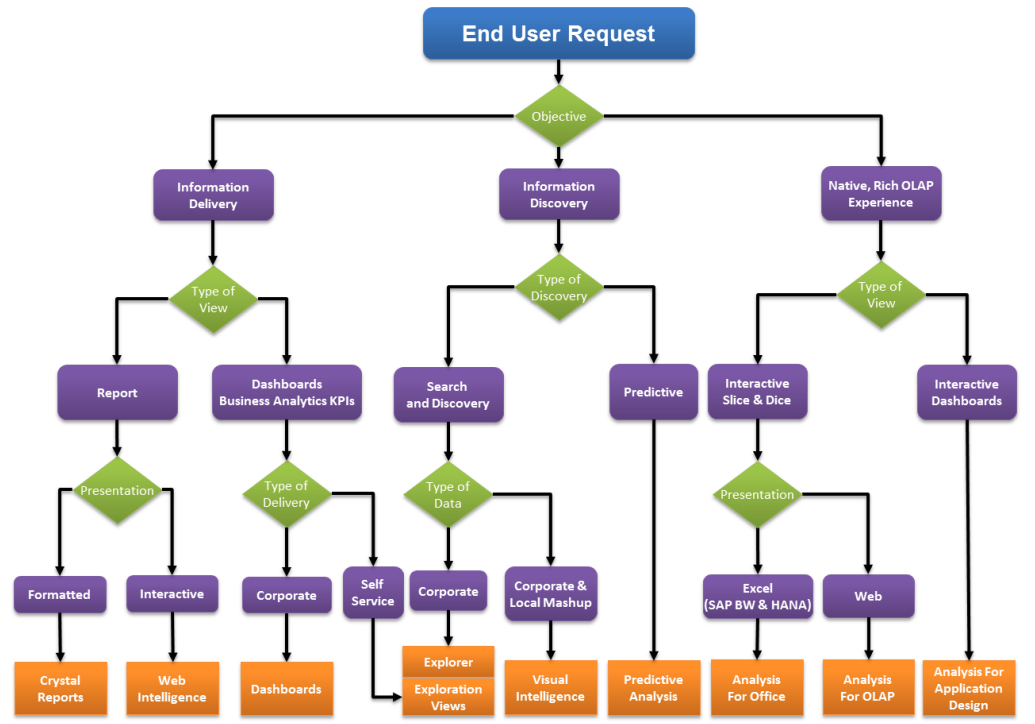
BusinessObjects ArchitectureI recently ran across a post of a good friend of mine who was talking about the BusinessObjects Product Suite at a very high level. Overall in this blog I assume that you are familiar with many of the tools in SAP BusinessObjects, but in case you are not, I wanted to refer you to this nice overview article.

You can access it here.

When we talk with customers, we always talk about the solution that SAP BusinessObjetcts is going to provide to their business problem. That’s what it’s all about. How do we help an organization: increase shareholder value, decrease expenses, reduce risk, increase productivity and performance, etc. We do that through leveraging the technologies of the BusinessObjects Suite to deliver intelligent information (and ultimately value) to the customer.

What You'll Notice When Installing XI 3.0

March 7th, 2008 4 comments

Here are a few things I noticed when installing XI 3.0 that I thought I would pass along.Installing XI 3.0 Notes

#1 – Time Remaining
The system no longer tells you the time remember. It was always fun to explain the end of the install when it was deploying the web applications and it would jump around from 2 seconds remaining to 2 hours remaining. Now you just get a simple and effective progress bar.

#2 – Wir sprechen Deutsch!
You should notice a heck of a lot more languages. BusinessObjects has embraced the concept of language packs and now allow you to create your own language packs.

#3 – New Utilities!
Diagnostic Tool, Software Inventory Tool , Translation Manager. I also don’t see the Security Viewer so hopefully that will be available as a separate install.

#4 – Silent Installation
Now you can create a “response” file by creating a blank text file and running setup.exe from a command window using: setup.exe -w C:\my_install_response.ini. You can then use that response file to do a new install by going to the command line again and running: setup.exe /qb -r C:\my_install_response.ini

#5 – In-Place Upgrade – Schweeet!
Hate finding new hardware to do an upgrade? XI 3.0 let’s you do an in-place upgrade. If you install XI 3.0 on a server that is already running XIR2, then it will detect it, copy the CMS content over, point the FRS of XI 3.0 to your existing FRS and let you uninstall XIr2. If you don’t like that, then you can do a side by side installation. It’s also supported (but be aware of potential port conflicts between the BOE or Tomcat services)

Other Things You Should Know

  • The initial release is Java-only. A .NET version is scheduled to ship later this year.
  • There is no native 64-bit version of BusinessObjects XI 3.0. It does however support 32-bit mode for 64-bit operating systems.

Can I Upgrade My Crystal Reports?

March 5th, 2008 6 comments

Crystal Reports you say? What version? It’s embedded in your application? How is it embedded? What does it do? Do you know what Developer Libraries they used? SDK? What? Who? When?

To be honest, the reason I joined Crystal Decisions all those many years ago was because of Crystal Reports. I’d used Crystal Reports may times in the past and I’d always been amazed at how easy it was to use. I was an old ISAM guy, so the fact that this tool could write SQL was pretty cool. (of course now I know that it’s not as good at writing SQL as other tools, but ignorance is bliss.) When I found an opportunity on HotJobs for a Presales Consultant I jumped at the chance. I’d always worked at small companies with < 150 employees and now – wow – I could get a chance to help sell a product that just about everyone in IT has heard of.

Why has everyone heard of it? Because it’s everywhere. The one good thing about Crystal Reports is that Greg Kerfoot knew the power of market share, so he bundled packaged, included, gave away, OEM’ed, shipped, advertised Crystal Reports in every way, shape and form. It really became a household name. A true reporting standard. Long before anyone ever thought of the term Business Intelligence, Crystal was blazing a trail, which brings me to my question at the start of this blog.

Can I Upgrade My Crystal Reports?

The great thing about Crystal is that it’s everywhere. My first few months at Crystal Decisions I learned that customers had developed all kinds of crazy was to use Crystal Reports and I needed to understand how they might use it so I could help them… especially as the web was now in full swing and people were wanting to web-enable their old Visual Basic applications.

Well, here is a summary of what I’ve learned over the years regarding Crystal Reports. There were a lot of different SDKs (Software Developer Kits) that were introduced over the years. As technologies changed, so did the libraries available to developers for creating applications. Here is a timeline of these changes.

The Bad News

The RDC, the most popular of the SDKs available for Crystal Reports has been depreciated and will not ship with XI 3.0. Although we introduced a new web-client centric SDK in 2002 with the advent of Crystal Reports 9 and Visual Studio .NET many customers have been slow to modify their legacy applications. When moving for RDC to one of the new APIs, you must rewrite your application.

Just like all other code migration from Visual Basic 6 to the .NET Framework, recoding is necessary when migrating from the Report Designer Component in Visual Basic 6 to Crystal Reports .NET. This is because of the new .NET APIs, which vary from the COM APIs.

One of my favorite stories was from back in the Crystal Reports 8 days. I remember visiting a customer who was complaining the Crystal was crashing. I went onsite and in those days if a machine has an IIS server on it, you could access Crystal Reports through the ActiveX viewer by referencing the report in a shared directory. This customer was running 120 concurrent users on a single CPU machine!! They had purchased a $500 piece of software and were serving up reports to thousands of end-users. No wonder the machine was falling over. That poor DLL was getting hammered. (Fortunately in Crystal 8.5 we limited the number of concurrent threads to 5 and no one complained that “Crystal was crashing”. Now it was time for us to collect… because before the 5 concurrent users had been a paper license).

Here is an example posting on Diamond for someone who can’t find all his old RDC features in the new RAS SDK.

The Better News

Crystal Reports continues to provide a RAS SDK as part of the Crystal Reports Developer Addition. This RAS SDK can be used to both embedded as well as managed report environments. An embedded environment is when you manage all the Crystal Reports content yourself through your application. This may be convenient but means there is a lot more work for the developer to do around managing content, scalability, etc.

Note: Consider carefully whether you will use embedded or managed reporting for your development product because the SDKs calls will vary slightly depending on which you use. In any case, make sure and encapsulate your logic around user authentication and opening reports. If you do need to change from embedded reporting to managed reporting, HERE is an excellent whitepaper that walks you through the process.

Originally we followed Microsofts lead my offering a web farm/web garden license, but that just got confusing. Now we make it a lot easier.

If you use Crystal Reports in an unmanaged mode, you will have a limited number of threads you can use. In some cases we offer packages with increased threads (For example we used to offer Crystal Enterprise Embedded which provided more capacity. This is no longer available outside of our OEM channel.) In all other cases, you will need to move to a managed reporting model. That means you will need to move the processing of the Crystal Reports off your application and onto a secondary service which will handle the report processing for you.

The introductory version of this server is called Crystal Reports Server.

The Best News

The best news is that once you move to managed reporting you can upgrade to more and more capabilities within our server product family. Crystal Reports Server is the introductory product. The other levels are:
  • BusinessObjects Edge Standard
  • BusinessObjects Edge Professional
  • BusinessObjects Edge Premium
  • BusinessObjects Enterprise Professional
  • BusinessObjects Premium
  • BusinessObjects Premium … plus add-ons
For Midmarket and Enterprise customers respectively.
And Remember the old ActiveX Viewer?
It used to be the only viewer. But now it’s a new day. I strongly recommend you try to stay away from the ActiveX viewer if possible. Although it’s not officially deprecated, it is legacy technology and it not supported with some of our latest developments (e.g. web services SDK). If you can avoid using it, I would. If you can’t, I’d like to know why.

Why use a Semantic Layer?

December 30th, 2007 2 comments

Recently I had a customer ask me about using a semantic layer.

They said:

I am unaware of anyone using a metalayer (Universe) for Business Objects Enterprise XI. Most developers will build the report connecting directly to Teradata (or other sources; Oracle, SQL Server) and then schedule the report on XIR2. I will normally build the SQL first and then plug it into a Command Statement in Crystal Reports using dynamic date ranges to eliminate user selectable parameters for dates. Others do use parameters, but it’s discouraged due to both the response time from Teradata and processing overhead can not be managed as effectively.

I thought this was a great question. Sometimes you are get so comfortable with the technology that you think everyone recognizes the elements of a good Business Intelligence system and understands the advantages and disadvantages of different infrastructure elements. The semantic layer is definitely secret sauce of BusinessObjects and it is the primary reason why it was able to grow to become the largest provider of Business Intelligence software.

What is the Semantic Layer?

The semantic layer is a business translation layer that sits between the database and the end user. This means that user can interact with their data using familiar business terminology instead of having to understand where the data resides and what business rules to apply to the data.

Semantic layer

What are the Advantages of a Semantic Layer?

Having a semantic layer on your database allows IT organizations to:

  • Guarantees Correct Results – by applying rules to define database complexity and ambiguity. These rules drive the generation of the SQL and guarantee that if two users ask for the same information, they will get the same results.
  • Guarantee Database Performance – by always generating the best SQL possible
  • Guarantee User Understanding and Acceptance – by allowing users to understand how modifying their query will result in different results, while at the same time giving them independence from IT. The #1 complaint from most business organizations is the amount of time it takes IT to build reports for them. They want the independence to be able to build their own reports and know that the results will be correct.

A semantic layer will be able to create sophisticated SQL and in many instances may need to generate multiple SQL statements in order to return the correct results (chasm trap/fan trap). The semantic layer must understand how to deal with database loops, complex objects, complex sets (union, intersect, minus), aggregate table navigation and shortcut joins.

For more information about some of these concepts, there is an excellent presentation by Integra Solutions here

Most importantly, the semantic layer allows an organization to define a single version of the truth. That means that regardless of what application or user pulls information from the database, as long as they use the semantic layer, they will always get the same answer. Now that we are in a post-Enron/WorldCom age of corporate governance and Sarbanes-Oxley, it is more important than ever to make sure that there are clear definitions for revenue, margin %, churn rate, turnover, etc.

Implementing a semantic layer will put an end to conference pickering over who’s numbers are correct because now everyone can make sure they are using the same numbers.

What are the Disadvantages of a Semantic Layer?

Now, as much as I love all the business value that comes with the semantic layer, there is a cost. Prior to working for Business Objects, I was with Crystal Decisions and we didn’t have a semantic layer, so we had to figure out all the reasons why not the use it. (We did eventually release a semantic layer called Business Views in Crystal Enterprise 10). Therefore, I thought it would be good to share with you what we felt were the problems with a semantic layer.

The main contention was that the semantic layer was an “extra layer”. It’s not free. It has to be created, maintained and managed. It must be kept in sync with any database changes that occur. The other point was that you can use database constructs such as database views or stored procedures to accomplish much of what the semantic layer provides.

The final disadvantage to the semantic layer or at least the semantic layer of BusinessObjects was that it could only connect to one database at a time. In other words, if you had data in MS SQL Server and Oracle, you needed a semantic layer for both.

Semantic Layer Rebuttal

Although all these points were true, in fact the arguments were quite week. Although the semantic layer does have to be created, maintained and managed, it’s a lot easier to maintain 2 or 3 semantic layer definitions than it is to maintain 1,000’s of reports.

It also means that you don’t have to engage the database administrator directly to create views and stored procedures. Most large organizations would not be nimble enough to make changes quickly to constructs that live within the database. Typically these would not be able to be added or modified in a production database unless the next “major” database application release. In addition, you still have the issue of chasm traps and the need to generate multiple SQL statements if data exists in multiple fact tables. This type of complexity could not be handled by a database view alone and stored procedures are very inflexible. They must be programmed. The bottom line is that the SQL generated by a stored procedure or view is much more likely to be less efficient than the semantic layer.

It is true that BusinessObjects can only connect to one data source per semantic layer, but our report tools provide two alternatives you can either:

  1. C reate a report pulling data from two universes and merge it in the report
  2. Implement Data Federator which will pull information from two different data sources in real time using a single semantic layer definition.

Finally, a good semantic layer allows you to add query governors onto your queries so you can limit:

  • how much data is pulled back
  • how long a query will run
  • who can connect to which dataset
  • what row and column level security might be applied (e.g. I can only see “NY” data because I’m a manager in NY, or I cannot see the salary column in the HR database because I’m not a supervisor.)

Moving Beyond Relational Data

What about non-relational data sources like cubes? Well, cubes have their own built in metadata. Hyperion Essbase calls it an “Outline”. Its a definition of how the cube is constructed. The person who designs a cube must define what the dimensions and facts of the cube are going to be. Because the predescribed definition is required for a cube, the semantic layer in essence already exists in a cube.

In the case of BusinessObjects, we read in the metadata from the cube and build the equivalent structure within our semantic layer. In addition, we will change the type of data querying we perform. Instead of generating SQL for example, we will generate MDX for MS SQL Server and SAP BW.

Conclusion

A semantic layer is a key component is any truly successful Business Intelligence implementation. It will help you to deliver a single version of the truth to your business users, while providing the safety and security to your IT department to guarantee that users will only access data they are allowed to access, while now allowing them to accidently run a table scan against a 100 million row fact table. One of the hardest things about creating reports is knowing where to get the data and validating that the data is correct. The semantic layer delivers both of these in spades. Report developers can let the semantic layer ‘find’ the data for them and because it’s coming from the semantic layer, it must be correct because it’s already been validated by IT.

Remember: The semantic layer as the semantic center between your two halves of your BI cookie.

Semantic Layer Cookie

Hmmm. Good.